

What it does
You give it something written — a product concept, a pitch, a news story, a launch announcement — and tell it in plain English what you want to know.
It builds a digital world populated with thousands of AI agents. Each one has its own personality, its own memory that persists across the simulation, and its own behavioural logic. They talk to each other. They argue. They change each other’s minds.
Then it tells you what the crowd concluded, and why.
The use cases people have actually run with it are stranger than the pitch suggests. Public opinion forecasting on real controversies. Financial and political prediction. And in the demo that got it attention, predicting the lost ending of Dream of the Red Chamber — the Chinese classic whose final chapters were never finished.
How it works under the hood
Four stages, and knowing them changes how you write your input.
1. Graph building. It extracts the key entities from your material and builds a knowledge graph using GraphRAG. Everything downstream depends on this, which means vague input produces a thin graph and a useless simulation.
2. Environment setup. It pulls the relationships between entities and generates the agent personas from them. The personas come out of your material, not from a generic template — so the crowd you get reflects the world you described.
3. Simulation. Agents run across two parallel social platforms simultaneously, with dynamic temporal memory so they remember what they said and who said what to them. This is where the arguing happens.
4. Report generation. A dedicated report agent analyses the whole interaction log and produces the prediction. It has its own toolset, so you can interrogate the result afterwards rather than just reading a static output.
The practical takeaway: stage one determines everything. Give it a detailed concept document, not a one-line idea.
Which version to actually run
This is the part the GitHub page won’t make obvious. There are three routes and they have very different costs.
Route 1 — The original repo
The canonical project, 75,000+ stars. Chinese-language interface. Uses Zep Cloud for graph memory and DashScope or OpenAI for the model calls.
Cost: you pay per API call, and a simulation with thousands of agents interacting over multiple rounds is a lot of calls. Run a small simulation first and watch the bill before you scale it up.
Use this if: you want the original, you’re comfortable with a Chinese UI, and you’d rather pay for API than manage infrastructure.
Route 2 — The offline English fork
github.com/nikmcfly/MiroFish-Offline
Fully local, fully English. Over 1,000 interface strings translated. Replaces Zep Cloud with Neo4j Community Edition and swaps the cloud model for Ollama running locally.
What you need:
Docker and Docker Compose (the easy path), or Python 3.11+, Node 18+, Neo4j 5.15+ and Ollama manually
Two models pulled:
qwen2.5:32bfor the LLM,nomic-embed-textfor embeddings16GB RAM minimum, 32GB recommended
10GB GPU VRAM minimum, 24GB recommended
20GB storage minimum, 50GB recommended
Setup: clone it, copy .env.example to .env, run docker compose up -d, pull the two models.
If your machine is lighter, you can drop to qwen2.5:14b or 7b. CPU-only works but is slow enough that you’ll want to start a simulation and go do something else.
Cost: zero per run, after the hardware. This is the version to use if you’re going to run this repeatedly.
Route 3 — CLI forks
Several exist, including amadad/mirofish-cli. Lighter, scriptable, no web interface. Good if you want to wire a simulation into an existing workflow rather than click through a UI.
My honest take on what it’s for
The creator’s own framing is the right one: this is a rehearsal space, not a crystal ball.
A simulated crowd is a crowd of language models reproducing patterns from their training data. It will tell you how a plausible-sounding population might react. It will not tell you how your actual customers will react, and anyone selling it as a replacement for talking to real people is selling you something.
Where it genuinely earns its place:
Finding the objection you didn’t think of. Thousands of agents attacking your pitch from thousands of angles will surface the one framing problem you’re blind to. That’s worth the setup cost on its own.
Stress-testing before an expensive launch. If the thing you’re about to ship costs real money to get wrong, a dry run is cheap insurance.
Pressure-testing messaging variants. Run the same product with three different positioning statements and see which crowd reaction looks healthiest. This is the use case I’d actually build a workflow around.
Where it will mislead you: anything where the real answer depends on information the models don’t have. Local market conditions, your specific customer base, pricing sensitivity in your category. The simulation will produce a confident answer anyway. That’s the trap.
If you’re going to try it
Start with the offline fork if you have the hardware — the per-run cost of the API version adds up faster than you’d expect with multi-round simulations.
Write a proper input document. One paragraph produces a thin knowledge graph and a simulation that tells you nothing.
And run something you already know the answer to first. Take a product launch that already happened, feed it in, and see whether the simulated crowd predicted what actually occurred. That’s the only way to calibrate how much to trust it on something you don’t know yet.
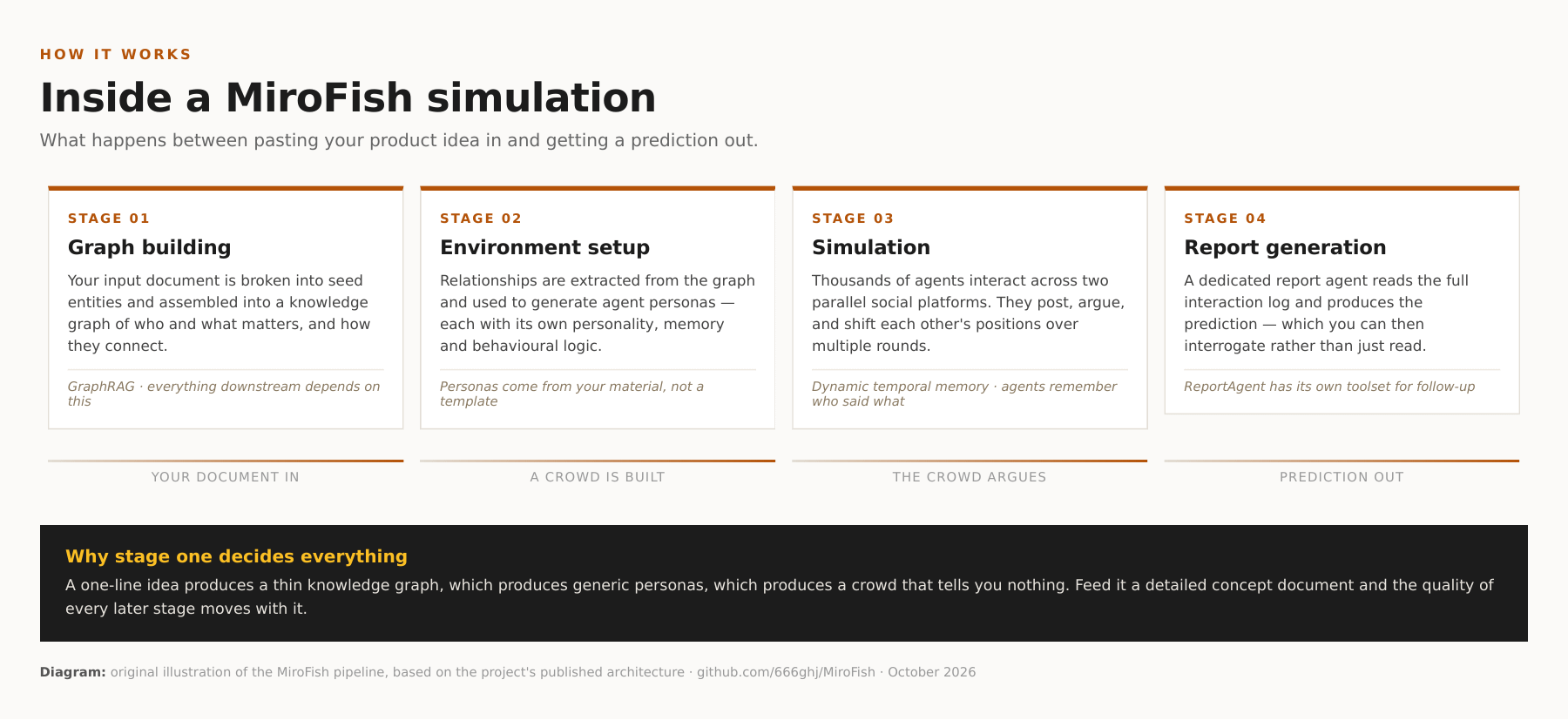
The four stages of a MiroFish run. Stage one determines the quality of everything after it.
Repo: github.com/666ghj/MiroFish · Offline English fork: github.com/nikmcfly/MiroFish-Offline